How do I insert an opt out message with the API?
The easiest way to include an opt-out message via the API is to use the {optout} token. You can also manually include the opt-out text in your message body if you prefer.
Using the {optout} token
Include {optout} anywhere in your message body, and Mobile Message will automatically replace it with the correct opt-out text for the sender you are using.
For example:
Hi {first_name}, your appointment is tomorrow at 10am.{optout}
The {optout} token is supported on both the /v1/messages and /v1/list-send endpoints.
What {optout} is replaced with
The replacement text depends on the sender type:
| Sender type | Replacement text |
|---|---|
| Dedicated number or shared number | Opt out: Reply Stop |
| Custom sender ID or your own number | OptOut mb.st/xxxxxx |
The token includes a leading space, so you can place it directly at the end of your message text. Your account's unique opt-out link (the mb.st/xxxxxx part) is inserted automatically.
The {optout} substitution is applied after any variable substitution ({first_name}, {last_name}, etc.), and the SMS part/credit calculation is based on the final message after all substitutions.
Manually including opt-out text
If you prefer not to use the {optout} token, you can type the opt-out text directly into your message body instead.
Dedicated number or shared number: Include wording that asks the recipient to reply STOP — for example, “Reply STOP to opt out”. When a recipient replies with STOP, the opt-out is handled automatically by the platform.
Custom sender ID or your own number: Recipients cannot reply directly to these senders, so you must use a link-based opt-out instead. Include your account's opt-out link in the format OptOut mb.st/xxxxxx.
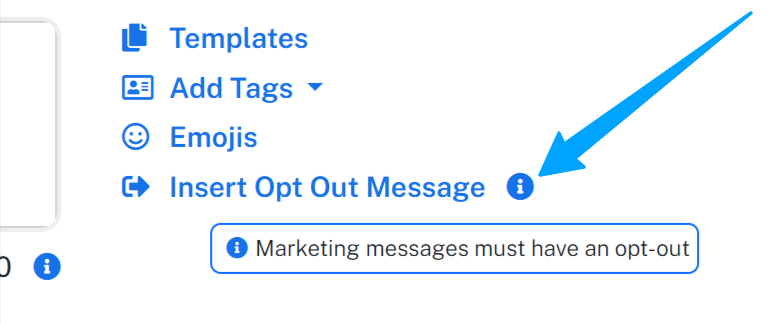
To find your account's opt-out link, log in to your Mobile Message account and go to Send Messages. Click the i icon next to Insert Opt-Out Message. This will display the opt-out link to use.
Important notes
- The API does not automatically append opt-out text to your messages. You must either include
{optout}in your message body or add the opt-out text manually. - If you are sending from your own mobile number, STOP replies go back to your phone and are not processed by the Mobile Message platform. Use the link-based opt-out (
mb.st/xxxxxx) so that opt-outs are recorded in-platform. See How Unsubscribes Work for more detail. - Including opt-out text helps ensure your messages comply with Australian spam requirements.