How to confirm a sender ID in ACMA Assist
When you register a custom sender ID with Mobile Message, some applications need to be confirmed directly by you in ACMA Assist — the Australian Communications and Media Authority's online portal. This is a quick final step that approves the registration of your sender ID on the SMS Sender ID Register.
Most sender ID applications submitted through Mobile Message don't require this step — you'll be directed to our internal fast-track verification flow instead. Only follow the steps below if you've received an email from Mobile Message or ACMA asking you to confirm your application in ACMA Assist.
Always access ACMA Assist from the link in the email you received from us or ACMA, rather than searching for it separately.
Step 1: Log in to ACMA Assist
ACMA Assist uses the Australian Government's myID app (formerly myGovID) to verify your identity. If this is your first time accessing the register, follow ACMA's official guide here:
Accessing the register for the first time (acma.gov.au)
The guide walks you through:
- Setting up the myID app on your phone
- Linking your business in Relationship Authorisation Manager (RAM)
- Logging in to ACMA Assist for the first time
You only need to complete this setup once. After that, logging in takes about a minute.
Step 2: Open the SMS Sender ID Register
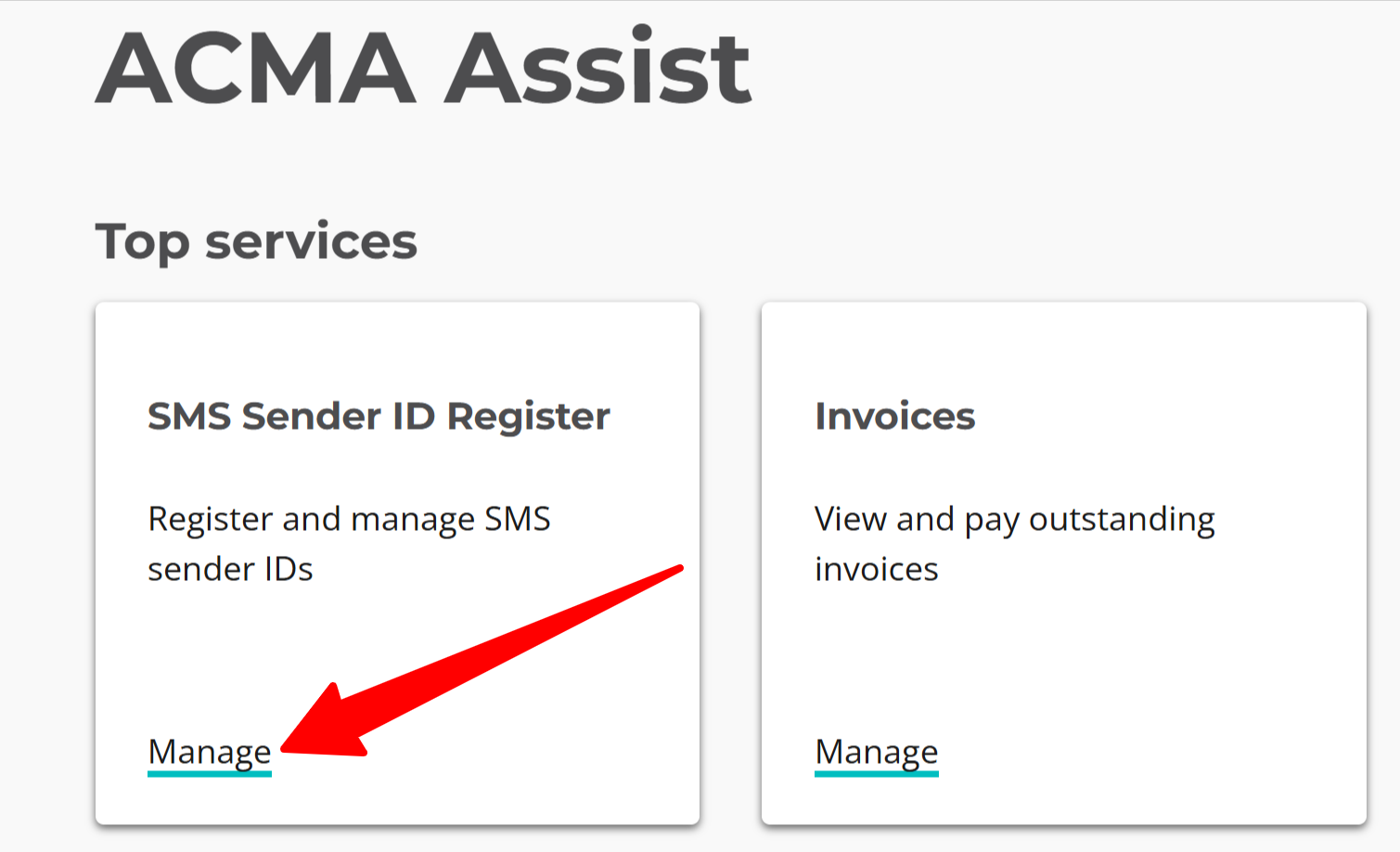
Once logged in to ACMA Assist, you'll see a list of services under Top services.
Click Manage under SMS Sender ID Register.
Step 3: Confirm your sender ID application
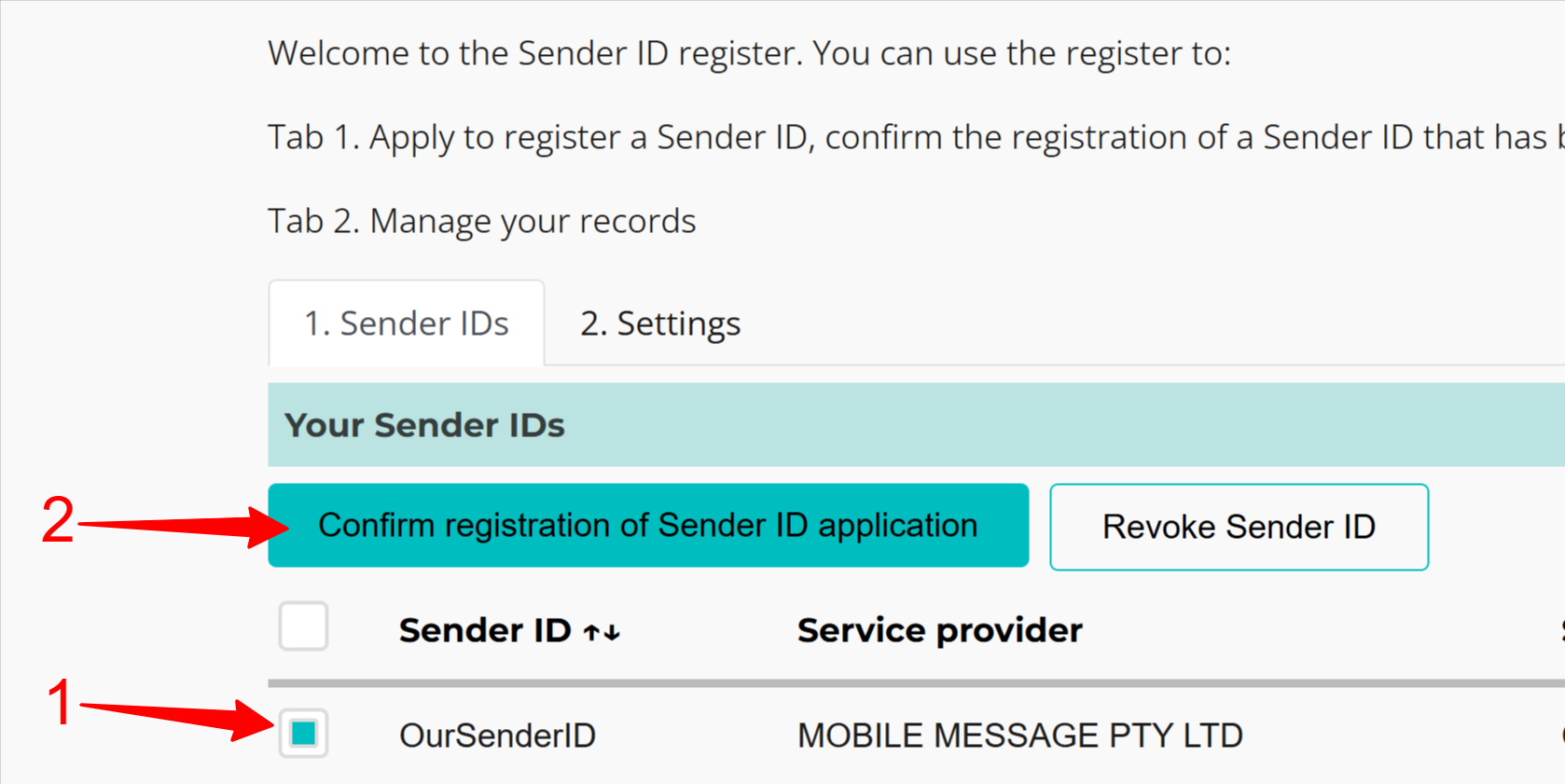
On the Sender IDs tab you'll see your sender ID listed with Mobile Message shown as the service provider.
- Tick the checkbox next to your sender ID
- Click Confirm registration of Sender ID application
That's it — your sender ID is now confirmed on the SMS Sender ID Register. ACMA Assist will show a Registered by <date> <time> — this is the date and time your sender ID will be registered and ready to use.
What happens next
Once you've confirmed in ACMA Assist, a 24-hour readiness period begins while the mobile networks update their systems so they'll accept your sender ID. The Registered by date and time shown in ACMA Assist is when it will be ready to use.
Your sender ID won't appear in the From dropdown on the Send Messages page until then. After the Registered by time, it's ready to select and send with, just like any other sender.
The 24-hour period only applies to newly registered sender IDs. If you were confirming a sender ID that's already registered in the ACMA Sender ID Register through another provider, the mobile networks already accept it, so there's no readiness period — it's ready to use as soon as you confirm.
If your sender ID still isn't available after the Registered by date and time shown in ACMA Assist, email us and we'll check the status for you.
Troubleshooting
I can't log in to ACMA Assist Follow the official first-time access guide. You'll need the myID app installed and your business linked in Relationship Authorisation Manager (RAM) before you can log in.
My sender ID isn't listed Only log in to ACMA Assist if Mobile Message or ACMA has directed you to. Many applications submitted through Mobile Message don't require this step — you'll be directed to our internal verification process instead. If you haven't received an email asking you to confirm in ACMA Assist, there's nothing for you to do here.
I see the wrong service provider Your sender ID should show MOBILE MESSAGE PTY LTD as the service provider. If it doesn't, contact us so we can check the application.