Understanding message delivery statuses
Every message you send through Mobile Message is assigned a delivery status. These statuses tell you what happened to the message after it left your account.
Where to see statuses
Statuses appear in the Status column on the History page. You can filter the table to show only messages with a specific status using the Status dropdown at the top.
You can also click What do the message statuses mean? at the bottom of the History page to see a quick reference guide.
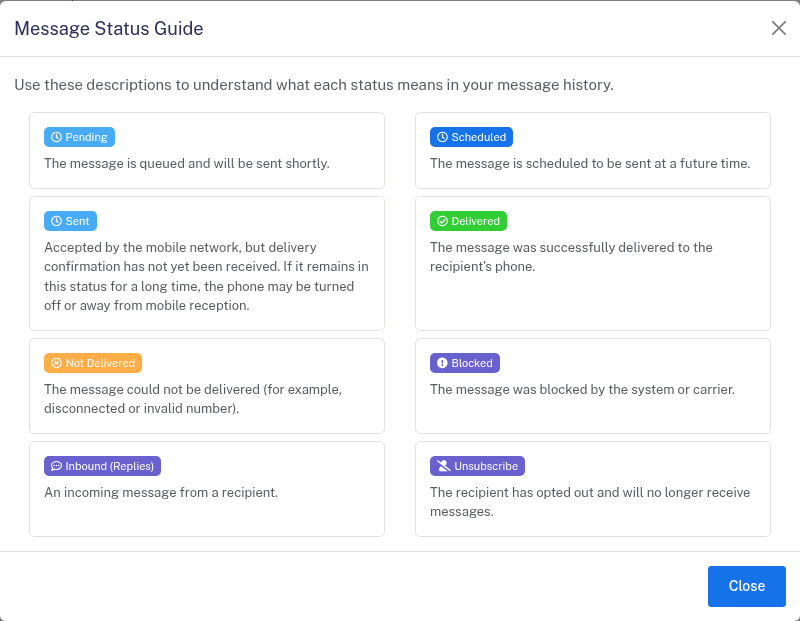
Status reference
Pending — The message is queued and will be sent shortly. Most messages leave this status within a few seconds.
Scheduled — The message is set to send at a future date and time. You can view and manage scheduled messages on the Scheduled SMS page.
Sent — The message has been accepted by the mobile network, but delivery confirmation has not yet been received. If a message stays in this status for a long time, the recipient's phone may be turned off or out of mobile reception.
Delivered — The message was successfully delivered to the recipient's phone.
Not Delivered — The message could not be delivered. Common reasons include a disconnected or invalid number, or a number that has been out of service for an extended period.
Blocked — The message was blocked before it was sent. This usually means the message has been blocked by us or a carrier.
Inbound (Replies) — An incoming message from a recipient. You can view and respond to inbound messages in the Messenger.
Unsubscribe — The recipient opted out by replying STOP or clicking your opt-out link. Their number has been added to your unsubscribe list automatically.
What to do with Not Delivered messages
If a message shows as Not Delivered, it's most likely not connected. Try calling the number to see if it's still connected. If you can't call it number, then you can't text it either.
For more on viewing and exporting your message data, see Viewing and exporting message history.